Bmw Sat Nav Disc Iso

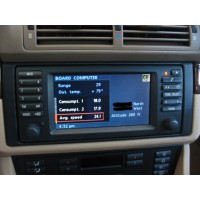
In this article, we will discuss in-depth the steps required to upgrade your BMW’s navigation computer, display, software, and maps. Pod Bot For Cs 1.3 Download on this page. The information in this article is only applicable to BMWs that speak the same ‘language’. All of the following models speak this same language, utilize the same connectors, and make use of the same hardware/software interface: • E38 7-series (1994-2001) • E46 3-series (1999-2006) • E39 5-series (1996-2003) • E53 X5 (2000-2006) • E83 X3 (2004-2010) • E52 Z8 (2000-2003) *It is important to note that in order to upgrade your navigation system, you must first have a navigation system from factory.
SAT Nav; Aurion; Also shop in. BMW map disk Australia Professional CCC, DVD map disc based navigation. BMW map disk Australia High CD or DVD map. Find great deals on eBay for bmw sat nav disc and bmw sat nav update disc. BMW SAT NAV DISC SATELLITE NAVIGATION DVD ROM 2012 FREE POST EUROPE PREMIUM L@@K. BMW Navigation System & Computer. Discussion in 'ICE. Have just got a 2006 nav disc. Hi,can anyone help me with this. I have just bought a 51 y reg bmw x5 with built in sat nav.
Retrofitting navigation to a car that did not originally come with one, while not impossible, is exceedingly challenging, time consuming, and expensive. This article does not cover or support such an endevour. *I will also note that BMWs produced for the Japanese market are not supported in this article. They used completely different wiring harnesses and electronic components for some reason, and they do not speak the same language.
Please read this article and watch these videos in full before commenting with questions. I have gone out of my way to make this article very thorough and comprehensive.
I purchased my 2000 BMW E39 M5 in July of 2010. Epygi Quadro 4x User Manual there. Per the VIN sticker on the inside B-pillar of the driver’s door, my car was produced 2/00 (February, 2000). This makes it a pre-facelift E39 with navigation. More specifically, it had BMW’s MKII navigation computer, and the 4:3 (small, square) display in the dashboard. Upgrading to the latest available components is actually a very simple process. For example, upgrading the first BMW made with navigation to the latest system in this generation of navigation systems hardware is simple. Very few modifications are required.
At the bottom of this article, you will find four embedded videos that detail the upgrade procedure in an E39 5-series. Other models will be essentially the same process. The first video demonstrates upgrading from a MKII computer to a MKIV, and the 4:3 to 16:9 display. Making Waves Studio Keygens.
The second video shows the software update process. For select MKIII computers, you will need to reference the third video, which shows how to create and use a Key-CD. The final video clearly demonstrates how to make your own MKIV V32 software update disc. We will now move on to identifying the hardware. NAVIGATION COMPUTERS MKI The MKI computer starts this generation of BMW navigation systems. The MKI first appeared in 1994 in the E38 7-series, and was moved into the E39 in 1995.
The MKI is the slowest system out of the four, and can be thought of as the first iPhone. It did the job, but was excruciatingly slow, and lacked a lot of functionality, as well as graphical features when compared to the later models.
MKI computers used only CD-ROM maps, had an external compass, and required a trimble module in-between the computer and GPS antenna. The MKI and MKII look identical (identifiable with a square eject button). MKII MKII computers started being included for the 1998 model year, and now had the compass built in the still required trimble. Hardware specifications improved, making the system slightly faster than a MKI. A female voice now replaced the MKI’s male voice, and CD-ROMs were still used for maps. (Above) MKII front. MKI looks identical.